
Most of the time, projects don’t fail because teams aren’t working.
When important updates don’t get to the right people, projects often fall behind because everyone starts using different ideas.
When stakeholders ask, “Where exactly are we right now?” All of a sudden, what seemed like a smooth project turns into a maze of communication.
That’s when a project poster can quietly become one of your best ways to communicate.
If you’ve ever struggled to explain project progress in a straightforward, visual, and stakeholder-friendly manner, this can help.
In this blog, you will see how to create a project poster that keeps everyone aligned and doesn’t end up ignored or forgotten.
What is a Project Poster?
A project poster is a one-page visual summary. It allows teams and stakeholders to quickly understand a project without having to read lengthy reports.
A project poster shows your goals, progress, milestones, risks, roadblocks, and next steps in a simple way. It does not replace full project documentation, but it does make communication easier, faster, and more engaging for all project participants.
Why Does a Project Poster Matters for Stakeholder Communication?
Stakeholders are frequently short on time and don’t require every project detail. They want clear updates on progress, risks, key decisions, and what happens next. A project poster makes the process easier by turning hard-to-understand updates into a picture.
Learning how to make a project poster enhances team communication, reduces confusion, and keeps stakeholders informed without lengthy reports or follow-ups.
4 Essential Elements Every Project Poster Should Include
A project poster should be concise without being ambiguous. It must be easy to understand and educational. You should always incorporate these four fundamental components.
Project Overview, Goals, and Objectives
Start by clearly explaining what the project is, why it is important, and what it hopes to achieve. This allows stakeholders to quickly understand the project’s purpose, expected outcomes, and overall business value.
Example:
- Project: Automating Release Notes from Jira
- Goal: Reduce manual effort in release communication
- Objective: Help teams publish accurate release updates faster across internal and customer-facing channels
Timeline, Milestones, and Current Progress
This part should say how the project is going and if everything is going as planned. A simple milestone or progress update lets everyone know what’s going on right away.
Example:
- Planning: Completed
- Template Setup: Completed
- Jira Workflow Mapping: In Progress
- Testing: Starts next week
- Internal Rollout: Scheduled for 25 June
Risks, Challenges, and Key Dependencies
Write down any issues, risks, or tasks that need to be finished before delivery can happen. This keeps everyone on the project up to date and provides them a better idea of how things are going.
Example:
Risk: Rollout may be delayed by one week
Reason: Pending approval on Slack integration workflow
Dependency: Final configuration from the engineering team
Team Ownership, Metrics, and Next Steps
Discuss who is in charge of the project, how far it has progressed, and what happens next. This improves the project poster’s usefulness and clarifies who is responsible for what.
Example:
Project Owner: Product Marketing Team
Progress: 80% template setup completed
Metric: Release notes creation time reduced by 40%
Next Step: Finalise testing and begin internal training next week
Best Practices for Creating a Project Poster Stakeholders Will Actually Read
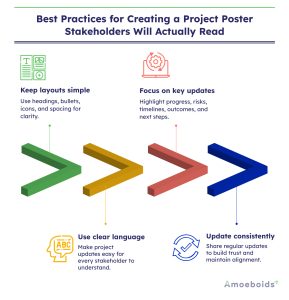
A few simple best practices can make your project poster clearer, more useful, and much easier for people to get involved with.
- Keep the layout simple, visual, and easy to scan: When you make a poster for a project, keep the design simple and easy to read. To make it easy for stakeholders to understand the project without having to read a lot, use short bullet points, clear headings, icons, and white space.
- Use clear language instead of technical jargon: Your project poster may be seen by leaders, clients, or non-technical stakeholders. That’s why you should use clear, direct language that doesn’t use jargon or technical shortcuts to explain the update.
- Focus on updates that matter to stakeholders: Stakeholders are usually concerned with progress, risks, outcomes, timelines, and next steps. Keeping your poster focused on the most important points makes it more useful and easier for people to act on.
- Update your project poster consistently: Regular updates help keep trust and let stakeholders know about the most recent developments. If you want to know how to create a project poster that people will use, consistency is just as important as design.
Common Mistakes to Avoid When Creating a Project Poster
If you leave out important information, even a well-designed project poster can fail. Keeping it clear and useful means not making common mistakes.
- Overloading the poster with too much information: A project poster should not tell the whole story of the project, it should only give a brief overview. If it has too much text, charts, or updates, stakeholders might not see the most important information.
- Using visuals that confuse instead of clarify: Visuals should help people understand your project, not make it harder to do so. If you need to explain charts, icons, or colors more, they might just make things more confusing instead of helping.
- Leaving out risks, blockers, or next steps: A poster that only shows good news can seem incomplete or not real. Stakeholders also need to see risks, blockers, and next steps to fully understand the project’s status.
- Treating the poster as a one-time document: A project poster should evolve and adapt as the project progresses. It quickly becomes outdated and less useful for stakeholder communication if it isn’t updated often.
Conclusion
A project poster not only lays out information, but it also improves the clarity, speed, and effectiveness of stakeholder communication. When learning how to make a project poster, focus on the most important things: clear updates, a good layout, and timely information.
So do you want to make it easier for people to understand and pay attention to your project updates?
Then, keep your poster simple, useful, and easy to scan, and look into more efficient ways to share updates with less manual effort.
