
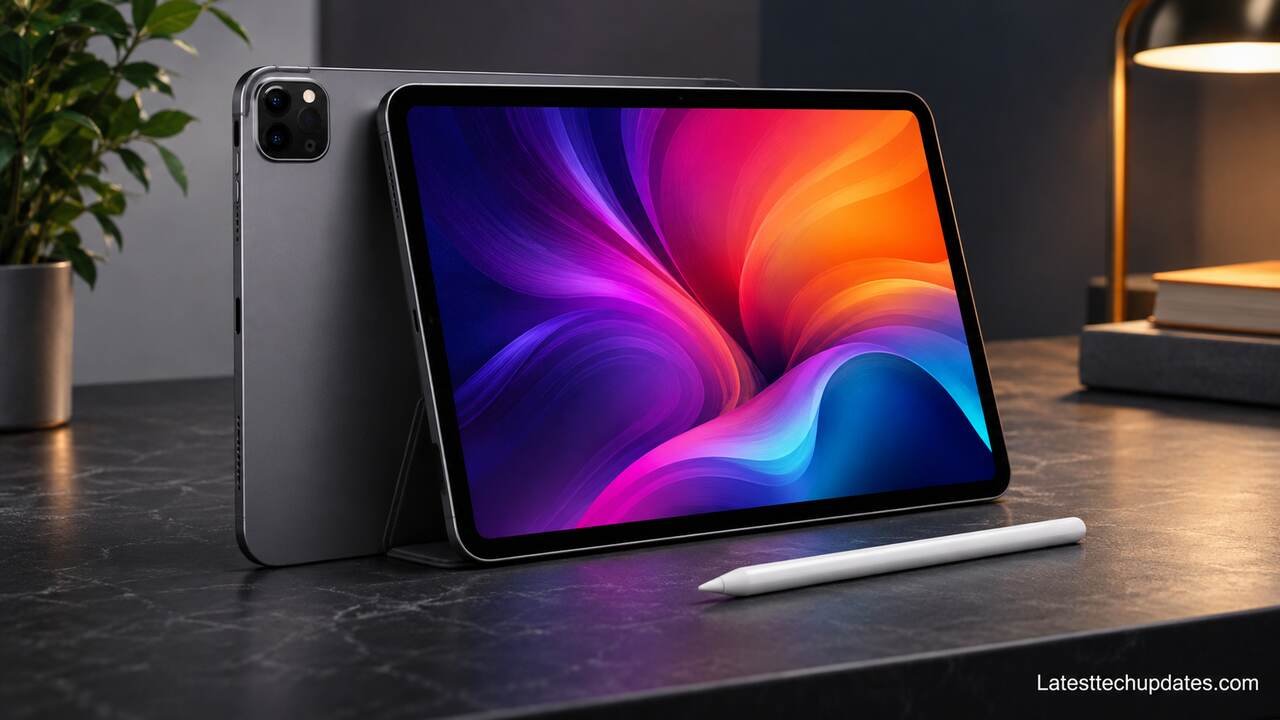
The iPad Pro 2022 is one of Apple’s most capable professional tablets, offering powerful M2 chip performance, a premium display, advanced Apple Pencil support, and impressive multitasking features. If you’re looking for a tablet that can handle creative projects, studying, video editing, or everyday productivity, this model still deserves your attention.
What Makes the iPad Pro 2022 Different From Other iPads?
The iPad Pro 2022 stands out because it combines Apple’s M2 processor with professional features that aren’t always available on standard iPad models. Unlike an entry-level tablet designed primarily for browsing and entertainment, this device can support demanding creative applications, external displays, and advanced multitasking. You can use it for everything from handwritten notes to editing high-resolution videos.
One of its biggest advantages is the combination of processing power and display quality. Both models feature ProMotion technology with an adaptive refresh rate of up to 120Hz, making scrolling, drawing, and animations feel exceptionally smooth. The M2 chip also provides enough processing capacity for demanding applications, although the actual performance you experience depends on the app and workload.
What makes this model particularly interesting today is its position in the secondhand and refurbished market. You may find it at a considerably lower price than a newer iPad Pro, while still getting features that are useful for professional work. However, you should compare its condition, battery health, storage, and accessory costs before deciding that an older Pro is automatically the better deal.
iPad Pro 2022 Design and Build Quality
The iPad Pro 2022 features a slim aluminum body, flat edges, and a minimalist design available in Silver and Space Gray. The 11-inch version weighs approximately 466 grams for the Wi-Fi model, while the 12.9-inch version weighs approximately 682 grams. Both feel premium, but the smaller version is noticeably more convenient when you’re carrying it between classes, meetings, or different rooms.
Available Sizes and Storage Options
Apple released the iPad Pro 2022 in 11-inch and 12.9-inch versions, with storage capacities of 128GB, 256GB, 512GB, 1TB, and 2TB. If you mainly browse websites, stream videos, and take notes, 128GB may be sufficient. However, if you work with large design files, downloadable media, or 4K videos, choosing at least 256GB or 512GB can make everyday storage management easier.
How Powerful Is the iPad Pro 2022 M2 Chip?
The M2 chip is the main reason the iPad Pro 2022 remains a capable device several years after its release. It includes an 8-core CPU, a 10-core GPU, and a 16-core Neural Engine, providing strong performance for multitasking, graphics-intensive applications, and machine learning tasks. You can comfortably use it for note-taking, photo editing, document management, and many professional creative workflows.
Apple equipped models with 128GB, 256GB, and 512GB storage with 8GB of RAM, while the 1TB and 2TB versions include 16GB of RAM. This difference matters if you frequently work with demanding creative applications or particularly large projects. However, extra memory doesn’t automatically make every application faster, so you should choose your configuration according to the work you actually do.
For a practical example, imagine editing photos in Lightroom while keeping reference material open in Safari and communicating through Messages. The iPad Pro 2022 has the processing capacity to handle this kind of workflow smoothly. More demanding tasks, such as working with multiple high-resolution video streams, depend on the software, project complexity, available storage, and thermal conditions.
Gaming Performance and Graphics Quality
The iPad Pro 2022 can run demanding games with detailed graphics and responsive controls. Its 10-core GPU and 120Hz display make supported games feel fluid, although not every game runs at 120 frames per second. Long gaming sessions may also produce warmth and increase battery consumption, particularly when you use high graphics settings and maximum screen brightness.
Multitasking and Professional Applications
With Stage Manager, the iPad Pro 2022 supports resizable app windows and more flexible multitasking than traditional full-screen iPad use. You can work with documents, presentations, browsers, and compatible creative applications while connecting an external display. Still, iPadOS doesn’t provide the same application compatibility or unrestricted file management as macOS, which is worth remembering if you’re considering replacing your laptop.
How Good Is the iPad Pro 2022 Display for Everyday Use?
The iPad Pro 2022 offers excellent display quality, but there’s an important difference between its two sizes. The 11-inch version uses a Liquid Retina display with LED backlighting and a resolution of 2388 × 1668 pixels. The 12.9-inch version features a Liquid Retina XDR display with mini-LED backlighting and a resolution of 2732 × 2048 pixels. Both deliver sharp text, accurate colors, and smooth scrolling.
The 12.9-inch model is particularly attractive if you edit HDR content, watch high-quality movies, or work with visually detailed projects. Its display supports up to 1,000 nits of full-screen brightness for HDR content and up to 1,600 nits of peak brightness for HDR highlights. The 11-inch model offers up to 600 nits of brightness, making it suitable for many indoor and outdoor situations, although direct sunlight can still make reflections distracting.
You should also consider how you plan to hold and use the tablet. A larger screen gives you more room for multitasking, illustration, and document editing, but it also makes the device heavier. If you regularly use your iPad while standing, commuting, or reading in bed, the smaller screen may offer a more comfortable experience despite its less advanced backlighting.
Liquid Retina vs Liquid Retina XDR Display
The Liquid Retina display on the 11-inch iPad Pro uses conventional LED backlighting, while the 12.9-inch Liquid Retina XDR uses mini-LED technology with local dimming zones. This allows the larger model to produce deeper blacks and stronger contrast in supported HDR content. However, you may occasionally notice blooming around bright objects against dark backgrounds, especially when viewing white text on a black screen.
Apple Pencil Hover and Drawing Experience
One of the most useful features introduced with the iPad Pro 2022 is Apple Pencil hover support. When you hold a compatible second-generation Apple Pencil up to 12mm above the display, supported applications can preview the position or effect of your next action. This is especially helpful for drawing, selecting tools, and making precise edits. The device supports Apple Pencil (2nd generation), but not Apple Pencil Pro.
What Are the iPad Pro 2022 Camera and Audio Features?
The iPad Pro 2022 includes a 12MP Wide rear camera, a 10MP Ultra Wide rear camera, and a LiDAR Scanner. These features make it useful for scanning documents, recording videos, capturing reference images, and working with supported augmented reality applications. Although its cameras are capable, you shouldn’t expect the same photography experience as a recent premium iPhone, particularly in difficult lighting.
On the front, Apple includes a 12MP Ultra Wide camera with Center Stage, which automatically adjusts the framing during supported video calls to help keep you visible. This can be particularly useful when you’re moving around during a presentation or speaking with family members. One limitation is the front camera’s portrait-edge placement, which can create an awkward viewing angle when the iPad is positioned horizontally.
Audio is another strength of the device. Its four-speaker system delivers stereo sound that adjusts to the tablet’s orientation, making movies, music, and video calls more immersive. It also includes five studio-quality microphones for recording audio and participating in meetings. However, for professional voiceovers or podcast recordings, a dedicated external microphone may still produce more consistent results.
Rear Camera and LiDAR Scanner Capabilities
The rear camera system supports 4K video recording at up to 60 frames per second, along with ProRes video recording subject to storage-dependent limits. The LiDAR Scanner measures depth and helps supported applications understand surrounding spaces. You can use it for room scanning, measurement, and certain 3D workflows, although the accuracy and usefulness depend on the application and environment.
Video Calls, Speakers, and Microphones
If you attend online classes or virtual meetings, the iPad Pro 2022 offers a practical combination of Center Stage, clear speakers, and multiple microphones. You can participate in FaceTime and other supported conferencing applications without needing separate audio equipment for ordinary calls. For longer meetings, a keyboard stand and Bluetooth headphones can make the setup more comfortable and reduce background distractions.
How Long Does the iPad Pro 2022 Battery Last?
Apple rates the iPad Pro 2022 for up to 10 hours of web browsing over Wi-Fi or video playback, while cellular models are rated for up to 9 hours of web browsing using a mobile data network. These figures are useful as a starting point, but actual battery life varies according to brightness, connectivity, background activity, application demands, and battery condition.
If you spend most of your day reading documents, taking notes, or browsing websites, the battery can support several hours of productive use. More demanding activities, such as gaming, video editing, or working at high brightness, consume power faster. The 12.9-inch display can also use substantial energy during bright HDR workloads, so screen size alone doesn’t guarantee longer battery life.
Because this model was released in 2022, battery condition is especially important when buying it used in 2026. A device that has experienced years of frequent charging may deliver noticeably less runtime than it did when new. Before purchasing, ask about battery condition, charging behavior, repair history, and whether the tablet shuts down unexpectedly under load.
USB-C Charging and Thunderbolt Connectivity
The iPad Pro 2022 includes a USB-C connector with Thunderbolt and USB 4 support, allowing you to connect compatible external drives, displays, docks, and other accessories. This is especially valuable if you regularly transfer large files or use your iPad at a desk. Charging is also handled through USB-C, although charging speed depends on the power adapter, cable, and device conditions.
Tips to Improve Battery Performance
You can extend battery life by reducing unnecessary screen brightness, limiting background activity, and turning off connectivity features when you don’t need them. Keeping iPadOS updated and avoiding prolonged exposure to excessive heat can also help maintain reliable operation. If you’re purchasing a refurbished model, remember that software settings cannot fully compensate for a heavily degraded battery.
Is the iPad Pro 2022 Better for Students or Professionals?
The iPad Pro 2022 can work well for both students and professionals, but its value depends on what you need to accomplish. Students may appreciate handwritten notes, PDF annotation, digital textbooks, and the ability to organize coursework in one portable device. Professionals may benefit from the M2 chip, external display support, advanced creative applications, and precise Apple Pencil input.
However, you shouldn’t assume that everyone needs a Pro model. If your main activities include watching lectures, browsing the internet, attending video calls, and typing assignments, a less expensive iPad may meet your needs. The Pro becomes more appealing when you regularly use demanding software, need its high-refresh-rate display, or want the larger 12.9-inch screen for complex projects.
A useful way to decide is to list your three most demanding weekly tasks. If those tasks include illustration, video editing, working with large creative files, or managing multiple apps on an external monitor, the iPad Pro 2022 makes more sense. If they’re primarily reading, messaging, and streaming, spending extra money on professional hardware may not improve your experience enough to justify the cost.
Using the iPad Pro 2022 for Studying and Note-Taking
For studying, the iPad Pro 2022 works particularly well with compatible handwriting and PDF annotation applications. You can write notes with the second-generation Apple Pencil, organize lecture materials, and split your screen between reference content and your work. The 11-inch model is easier to carry around campus, while the 12.9-inch version provides more writing space but takes up more room in your bag.
Creative Work, Video Editing, and Laptop Replacement
Creative professionals can use the iPad Pro 2022 for illustration, photography, video editing, and design work through supported applications. A compatible keyboard can also make writing and spreadsheet tasks more comfortable. However, some desktop applications, browser extensions, development tools, and specialized professional workflows remain unavailable or limited on iPadOS, so verify your required software before replacing a laptop.
Is the iPad Pro 2022 Worth Buying in 2026?
The iPad Pro 2022 can still be worth buying in 2026 if you find it at a competitive price and in good condition. Its M2 chip, ProMotion display, Thunderbolt connectivity, and Apple Pencil support remain useful for demanding tasks. However, newer iPad Pro models offer improvements in processing performance, display technology, accessory compatibility, and certain software capabilities, so the older model needs to offer meaningful savings.
Another important consideration is software longevity. Although the iPad Pro 2022 supports modern iPadOS features, including compatible Apple Intelligence capabilities, Apple doesn’t promise an exact final software support date for every iPad. Because the device is already several years old, you should factor in its remaining useful life, especially if you plan to keep it for another four or five years.
Before making a purchase, compare the total cost rather than the tablet price alone. For example, if a used iPad Pro costs $500 and you spend another $150 on a keyboard and Apple Pencil, your total investment becomes $650. At that point, a newer iPad bundle may be worth considering. The best choice depends on your budget, preferred screen size, required applications, and the condition of the available device.
iPad Pro 2022 vs Newer iPad Pro Models
Newer iPad Pro generations offer faster processors, updated display technology, and support for newer accessories, depending on the model. The 2022 version still handles many everyday and professional tasks effectively, but it lacks compatibility with Apple Pencil Pro and some newer hardware-specific features. If you mainly need note-taking, creative work, and general productivity, you may not notice a dramatic difference. If you want the latest display experience or the longest potential ownership period, a newer model is more attractive.
What to Check Before Buying a Used iPad Pro 2022
When purchasing a used iPad Pro 2022, inspect the display for scratches, dead pixels, uneven lighting, and touch responsiveness. Test Face ID, cameras, speakers, microphones, Wi-Fi, charging, and the USB-C port. Confirm that Activation Lock has been removed and that the device isn’t restricted by an organization’s management system. You should also verify the storage capacity, cellular compatibility if applicable, battery condition, and whether the seller provides a return policy.
iPad Pro 2022 Specifications at a Glance
| Feature | iPad Pro 11-inch (2022) | iPad Pro 12.9-inch (2022) |
|---|---|---|
| Processor | Apple M2 | Apple M2 |
| Display | Liquid Retina | Liquid Retina XDR |
| Resolution | 2388 × 1668 | 2732 × 2048 |
| Refresh rate | Up to 120Hz | Up to 120Hz |
| Storage | 128GB to 2TB | 128GB to 2TB |
| RAM | 8GB or 16GB | 8GB or 16GB |
| Rear cameras | 12MP Wide + 10MP Ultra Wide | 12MP Wide + 10MP Ultra Wide |
| Front camera | 12MP Ultra Wide | 12MP Ultra Wide |
| Connectivity | Wi-Fi 6E, optional 5G | Wi-Fi 6E, optional 5G |
| Charging port | USB-C with Thunderbolt | USB-C with Thunderbolt |
| Apple Pencil | 2nd generation | 2nd generation |
| Starting US launch price | $799 | $1,099 |
The prices shown are original US launch prices, not current retail or refurbished market prices.
Conclusion
The iPad Pro 2022 remains a capable premium tablet in 2026, especially for people who value powerful performance, a responsive display, Apple Pencil support, and flexible productivity features. Its M2 processor continues to offer substantial processing power, while the 12.9-inch Liquid Retina XDR display remains particularly appealing for visual work.
If you’re considering buying one today, focus on three things: the price difference compared with newer models, the condition of the device, and the applications you actually need. A well-maintained iPad Pro 2022 at the right price can be a sensible purchase, but paying close to the price of a newer model reduces its value.
For portability and everyday productivity, the 11-inch version is a practical choice. For illustration, detailed editing, and working with multiple windows, the 12.9-inch version offers a more spacious experience. Ultimately, choose the model that supports your daily work comfortably rather than paying extra for features you may rarely use.
FAQ’s
Does the iPad Pro 2022 Support Apple Intelligence?
Yes, the iPad Pro 2022 uses Apple’s M2 chip, which meets the hardware requirement for Apple Intelligence. However, availability depends on your installed iPadOS version, supported language, region, and the specific feature you want to use.
Can You Use the iPad Pro 2022 Without an Apple Pencil?
Yes, you can use the iPad Pro 2022 without an Apple Pencil for browsing, gaming, watching videos, typing, and most everyday activities. The Apple Pencil is an optional accessory that becomes especially useful for drawing, handwriting, and precise editing.
Does the iPad Pro 2022 Have a Headphone Jack?
No, the iPad Pro 2022 doesn’t include a traditional 3.5mm headphone jack. You can use Bluetooth headphones, compatible USB-C headphones, or a suitable USB-C audio adapter.
Can the iPad Pro 2022 Connect to an External Monitor?
Yes, the iPad Pro 2022 supports external monitors through its Thunderbolt and USB-C connection. With Stage Manager and a compatible display, you can extend your workspace rather than simply mirror the tablet screen.
Is 128GB Enough Storage for the iPad Pro 2022?
For basic productivity, studying, streaming, and note-taking, 128GB can be sufficient. However, if you regularly download large games, edit high-resolution videos, or store extensive creative projects, 256GB or 512GB provides more flexibility. The 128GB model also has a lower ProRes recording limit than higher-storage versions.
Read Also: Lenovo IdeaPad 3 Review: Breakdown of Performance, and Features
