
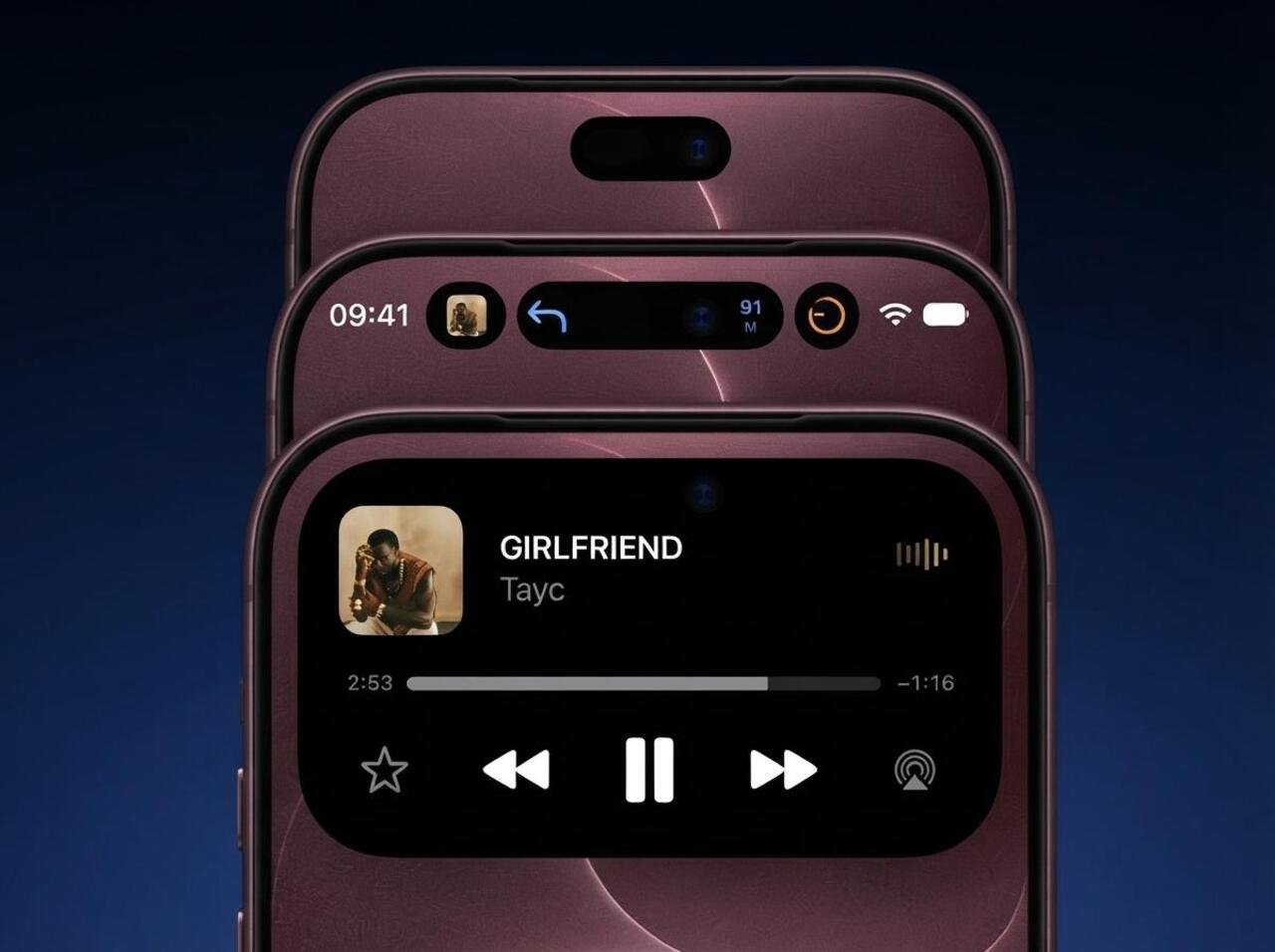
The iPhone 18 Pro Max introduces a smaller Dynamic Island, improved multitasking with support for up to three Live Activities, and updated Face ID technology. While Apple has refined the display design and facial recognition system, full under-display Face ID remains unconfirmed.
What Changed in the iPhone 18 Pro Max Face ID and Dynamic Island?
The biggest change is the redesigned Dynamic Island, which occupies less space at the top of the display and supports more simultaneous information. Face ID continues to provide secure authentication for unlocking the phone, approving purchases, and accessing supported apps.
Apple has also maintained the familiar relationship between the front-facing camera system and Dynamic Island. Rather than replacing the interactive cutout with a completely uninterrupted display, the company refined its appearance and expanded its functionality.
The main differences are summarized below.
| Feature | iPhone 17 Pro Max | iPhone 18 Pro Max |
| Face ID | TrueDepth-based facial recognition | Face ID retained |
| Dynamic Island size | Previous-generation design | Smaller, redesigned cutout |
| Live Activities | Existing Dynamic Island experience | Up to three simultaneously |
| Under-display Face ID | Not advertised | Complete under-display implementation not confirmed |
| Front camera | 18MP Center Stage | 18MP Center Stage |
| Display size | 6.9 inches | 6.9 inches |
| Operating system at launch | iOS 26 | iOS 27 |
Apple confirms the Dynamic Island redesign and the three-activity capability in its launch announcement. Its published technical specifications also establish that Face ID remains part of the iPhone 18 Pro Max.
iPhone 18 Pro Max Face ID: What Is New?
Face ID remains the primary biometric authentication system
The iPhone 18 Pro Max continues to use Face ID for facial recognition. Users can unlock their devices, authorize Apple Pay purchases, access password-protected information, and authenticate within compatible applications.
Face ID relies on Apple’s TrueDepth technology to recognize facial characteristics rather than relying on an ordinary two-dimensional photograph. Its depth-aware authentication helps distinguish a real face from a flat image.
The underlying approach remains familiar to existing iPhone owners. Users look at the screen to authenticate, while the system evaluates whether the detected face matches the enrolled biometric data.
Did Apple move Face ID underneath the display?
Before launch, multiple reports suggested that Apple planned to relocate selected Face ID components beneath the OLED display. The proposed approach would allow infrared-based hardware to operate through the screen while reducing the need for a large visible cutout.
However, Apple’s September 2026 announcement describes an advanced display redesign without explicitly confirming which Face ID components have moved beneath the screen.
This distinction matters because under-display Face ID can describe several different implementations:
- Partial integration: Selected infrared components sit beneath the display while other sensors remain visible.
- Full integration: The facial recognition hardware operates beneath the display, potentially leaving only the selfie camera visible.
- Completely uninterrupted display: Both facial recognition sensors and the front camera are hidden beneath the screen.
The iPhone 18 Pro Max has a smaller Dynamic Island, but that alone does not establish that Apple implemented either full under-display Face ID or a completely uninterrupted front display.
Earlier reporting discussed a possible under-display dot illuminator and miniaturized camera hardware. These reports help explain the expectations surrounding the redesign, but they should not be treated as confirmed technical specifications.
Does the smaller Dynamic Island affect Face ID security?
There is no indication in Apple’s official product announcement that the redesigned Dynamic Island reduces Face ID’s authentication capabilities.
The visible size of the cutout and the security of facial recognition are different technical considerations. Dynamic Island is a display and software interface, whereas Face ID depends on its sensing hardware and biometric authentication system.
Consequently, a smaller cutout does not automatically mean weaker facial recognition.
However, Apple has not published a specific comparison showing faster Face ID authentication, improved recognition angles, or higher accuracy relative to the iPhone 17 Pro Max. Those enhancements should not be assumed simply because the design has changed.
iPhone 18 Pro Max Dynamic Island: Smaller Design and New Features
The iPhone 18 Pro Max introduces a smaller, more capable Dynamic Island that improves how users monitor ongoing activities without constantly switching applications.
Apple originally introduced Dynamic Island as a way to turn the front camera and sensor area into an interactive interface. The feature combines hardware cutouts with software animations, notifications, and activity controls.
On the iPhone 18 Pro Max, this concept expands to support more information in the same general area of the display.
A smaller cutout provides a cleaner display
The redesigned Dynamic Island reduces the visual footprint of the front-facing cutout. This makes the upper portion of the 6.9-inch display appear less crowded.
A smaller cutout can be especially noticeable when viewing wallpapers, browsing websites, reading documents, or watching full-screen content.
However, the iPhone 18 Pro Max does not have a completely notch-free or cutout-free display. The Dynamic Island remains visible and continues to support interactive functions.
Apple has not published a precise percentage reduction in the Dynamic Island’s dimensions in its launch announcement. Any exact claim about its width or height reduction would therefore require independently verified measurements.
Up to three Live Activities at once
The most significant functional upgrade is support for displaying three Live Activities simultaneously.
Live Activities provide continuously updated information from ongoing tasks, such as navigation, timers, sports scores, or compatible applications.
On the iPhone 18 Pro Max, the redesigned interface can present more activity information without requiring users to repeatedly open different apps.
For example, someone traveling across a city could potentially follow navigation directions while monitoring music playback and another supported Live Activity.
Apple specifically highlights sports scores, navigation, and music as examples of information available through its redesigned Dynamic Island.
Not every application supports Live Activities, and displaying three activities does not guarantee that every activity will show all of its available details simultaneously. The presentation depends on application support, activity priority, and available interface space.
Interactive controls remain available
Dynamic Island continues to function as an interactive part of the iPhone interface rather than a static notification area.
Users can interact with supported activities to access related information and controls. This makes it possible to manage ongoing tasks without navigating through multiple application screens.
The practical advantage is reduced interruption. A user listening to music while navigating can monitor relevant information near the top of the display while continuing to use another application.
The redesigned interface builds on this existing interaction model rather than replacing it with a completely new navigation system.
How Face ID Security and Privacy Work on the iPhone 18 Pro Max
Apple’s updated Face ID documentation confirms a technical refinement that goes beyond the appearance of the Dynamic Island.
On iPhone 18 Pro models, the depth map and infrared image used during authentication are supplemented by additional image data to help maintain facial recognition performance. Apple’s documentation also describes a separate security mechanism for processing this supplemental information.
Additional image data supports facial recognition
Traditional Face ID uses the TrueDepth camera to project and analyze invisible dots, creating a three-dimensional representation of the user’s face. The system also captures infrared information.
The iPhone 18 Pro Max adds supplemental image data to this process. This is relevant because Face ID must continue to work reliably even as Apple changes the physical design of the front-facing sensor area.
Apple does not claim that the additional information makes authentication a specific percentage faster or more accurate. Its stated purpose is to maintain Face ID performance.
Face ID data remains protected on the device
Apple explains that Face ID mathematical representations are encrypted and protected by the Secure Enclave.
Supplemental image data used on supported devices is processed using the Secure Exclave, a hardware-isolated environment designed to keep that processing separate from the operating system.
According to Apple’s security documentation, Face ID data is not backed up to iCloud or made available to applications or Apple itself.
Apple continues to state that the probability of a random person successfully unlocking a device with Face ID is less than one in a million for a single enrolled appearance. That figure is not a new iPhone 18 Pro Max-specific benchmark, and the likelihood can be higher for closely related individuals.
How to Use the Redesigned Dynamic Island
The iPhone 18 Pro Max runs iOS 27 and includes gestures for viewing and managing activities in the redesigned Dynamic Island.
Apple’s user guide documents the following interactions.
| Action | What to do |
| Expand an activity | Touch and hold the activity |
| Collapse expanded information | Swipe the expanded activity upward |
| Switch between two activities | Tap the activity you want to view |
| Navigate among multiple activities | Swipe across the Dynamic Island |
The new swipe interaction is particularly useful when three Live Activities are present. Instead of requiring each activity to remain fully expanded, the interface allows users to move between ongoing tasks.
Example: Managing multiple activities during a journey
Imagine you’re using Apple Maps for navigation while listening to music and monitoring an ongoing sports match.
On an iPhone 18 Pro Max, supported Live Activities can appear together near the top of the display. You can check the available information, move between activities, or expand one when more detail is needed.
This interaction can reduce the number of times you need to leave your current app. However, app developers must support the relevant Live Activity functionality, and the interface’s behavior can vary between applications.
Face ID With Masks, Glasses, and Different Lighting Conditions
Face ID remains designed to accommodate common changes in a user’s appearance, including glasses, facial hair, and certain face coverings.
Apple’s guidance confirms that Face ID with a mask requires the system to recognize the area surrounding the user’s eyes. It is not designed to function with sunglasses while the mask-specific mode is active.
On the iPhone 18 Pro models, Apple also acknowledges that users wearing both a mask and glasses may sometimes need to adjust their phone’s position. Difficult lighting conditions, including strong backlighting, can also interfere with authentication.
How to improve Face ID recognition
For more reliable everyday use, open Settings → Face ID & Passcode and review the available authentication settings.
If you regularly wear glasses, register them using the Add Glasses feature where available. Apple supports registering multiple pairs for Face ID with a mask.
If authentication fails, check whether the front-facing sensor area is obstructed, move the phone into a more suitable position, or enter your passcode when prompted.
The smaller Dynamic Island does not eliminate environmental limitations. Facial recognition still depends on the system obtaining sufficient information about the user’s face.
What Happened to the iPhone 18 Pro Max Under-Display Face ID Rumors?
The months preceding the iPhone 18 Pro Max announcement produced conflicting predictions about Apple’s display design.
Some reports suggested that Apple would introduce a small punch-hole camera and relocate Face ID sensors beneath the OLED panel. Other reports predicted a shorter Dynamic Island rather than its complete removal.
The eventual product is more consistent with the second prediction: a smaller Dynamic Island that retains the familiar interactive design.
A simplified timeline helps separate the reporting from the confirmed features.
| Period | Report or development | Status |
| January 2026 | Reports discussed under-display Face ID and a shorter Dynamic Island | Pre-launch speculation |
| February 2026 | Additional reporting favored a smaller Dynamic Island with selected components potentially beneath the display | Pre-launch speculation |
| September 9, 2026 | Apple announced a smaller Dynamic Island supporting three Live Activities | Officially confirmed |
| September 2026 | Apple’s updated support documentation described supplemental Face ID image data | Officially documented |
Why under-display Face ID is technically challenging
Moving biometric sensors beneath an OLED screen requires solving more than a simple packaging problem.
An OLED panel contains layers that can affect how light passes through the display. Because Face ID uses infrared imagery and depth information, any change to the optical path must be compatible with accurate sensing.
Manufacturers also need to consider display brightness, image quality, sensor alignment, and the amount of infrared light reaching the system.
A fully hidden front camera introduces additional challenges because the display can affect the clarity of images captured through it.
These engineering constraints help explain why partial integration and smaller visible cutouts are plausible intermediate design approaches. They do not, however, establish exactly which internal components Apple relocated in the iPhone 18 Pro Max.
Does the New Dynamic Island Make the Display Better?
The iPhone 18 Pro Max includes a 6.9-inch Super Retina XDR OLED display with ProMotion technology supporting adaptive refresh rates up to 120Hz.
Its smaller Dynamic Island changes how the top portion of that display is occupied. However, the improvement should be assessed separately from broader display characteristics such as resolution, brightness, and refresh rate.
Apple’s technical specifications list a 2868-by-1320 resolution at 460 pixels per inch for the iPhone 18 Pro Max.
More screen space does not mean every app uses it
Reducing the cutout’s size can improve the appearance of the display, but it does not automatically change the layout of every application.
An app’s presentation depends on iOS layout rules, supported display regions, and its own interface design. Video applications may also use different scaling or cropping options.
The smaller Dynamic Island is most likely to feel beneficial during everyday activities that use the upper part of the display, especially when paired with its enhanced Live Activity features.
For users who spend most of their time watching full-screen video, the visual difference may be less important than the redesigned interface’s practical functionality.
Is the iPhone 18 Pro Max Worth Upgrading to for Face ID and Dynamic Island?
The Face ID and Dynamic Island changes improve the iPhone 18 Pro Max experience, but they are unlikely to justify an upgrade on their own for everyone.
Face ID already works effectively on recent Pro iPhones, and previous Dynamic Island implementations provide access to ongoing activities.
The strongest reason to value the new design is the combination of a smaller cutout, improved activity management, and Apple’s updated Face ID processing.
Consider these situations:
- Coming from an iPhone 14 Pro or older Pro model: The smaller Dynamic Island and newer system features may feel more noticeable, particularly alongside improvements in other areas of the phone.
- Coming from an iPhone 16 Pro Max or 17 Pro Max: The redesigned island is a refinement rather than a complete change to facial authentication.
- Frequently monitoring navigation, sports, timers, or other activities: Support for three Live Activities offers a more tangible everyday advantage.
- Waiting for a completely uninterrupted display: The iPhone 18 Pro Max does not meet that requirement, because Dynamic Island remains part of its front design.
The iPhone 18 Pro Max also offers broader upgrades, including the A20 Pro chip, improved battery capabilities, and a variable-aperture main camera. Buyers should evaluate those improvements alongside the interface changes rather than making a purchasing decision based only on the cutout.
Frequently Asked Questions
1. Does the iPhone 18 Pro Max have under-display Face ID?
Apple confirms that the phone uses Face ID and has a smaller Dynamic Island. It also documents additional image data used during Face ID authentication. However, its published materials do not definitively specify that the entire Face ID hardware system is hidden beneath the display.
2. Is Dynamic Island completely removed from the iPhone 18 Pro Max?
No. Apple has retained Dynamic Island but redesigned it to be smaller and more functional. The device does not have a fully uninterrupted front display.
3. How many Live Activities can the iPhone 18 Pro Max Dynamic Island display?
The redesigned Dynamic Island supports up to three Live Activities at once. Users can swipe across the island to navigate between activities, although the available information depends on application support.
4. Is Face ID faster on the iPhone 18 Pro Max?
Apple documents updated facial recognition processing that incorporates supplemental image data, but it has not provided a specific speed improvement relative to the previous generation. A faster unlock time should not be assumed without reliable comparative testing.
5. Does the redesigned Dynamic Island work with third-party apps?
Yes. Compatible third-party applications can use Apple’s Live Activities system. However, an application’s information will not automatically appear in Dynamic Island unless the necessary functionality is supported and enabled.
6. Does the iPhone 18 Pro Max still have a TrueDepth camera?
Yes. Apple’s official technical specifications identify Face ID as being enabled by TrueDepth technology in the Center Stage front camera. The phone retains an 18MP front camera while introducing refinements to its surrounding display interface.
Conclusion
The iPhone 18 Pro Max brings a meaningful evolution to Apple’s Face ID and Dynamic Island design. Its smaller Dynamic Island creates a cleaner appearance, while support for three simultaneous Live Activities makes the top of the display more useful for multitasking.
Face ID remains the central biometric authentication method, with Apple’s updated documentation confirming supplemental image processing designed to maintain recognition performance. The long-rumored fully hidden sensor system, however, should not be treated as confirmed.
For users upgrading from an older iPhone, these refinements contribute to a more polished experience. For owners of recent Pro Max models, the deciding factors will likely be how often they use Live Activities and how much they value the iPhone 18 Pro Max’s broader hardware upgrades.
