
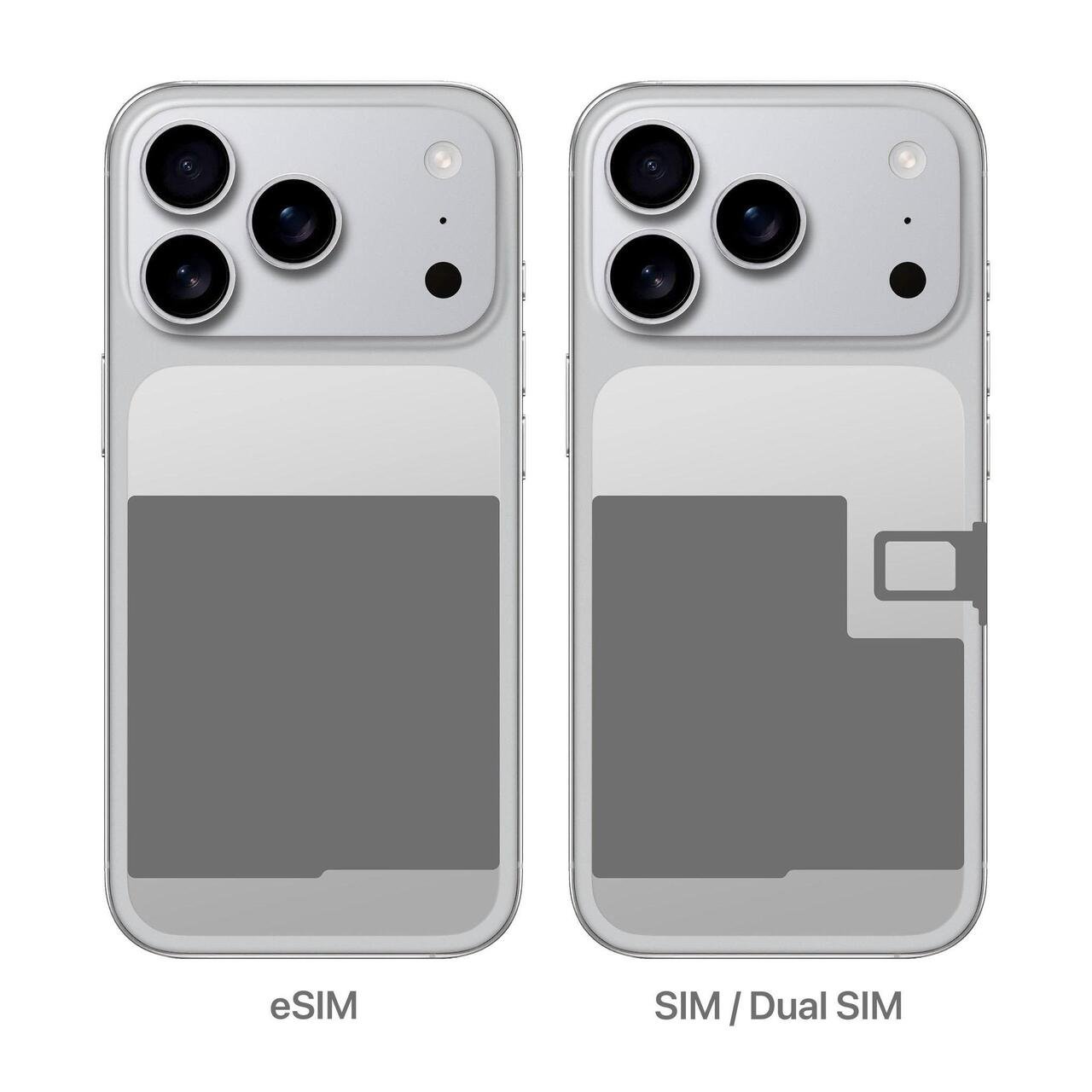
The iPhone 18 Pro Max supports Dual SIM, but SIM options vary by region. Models sold in the US, Canada, and Japan are eSIM-only, while the UK and many other markets support both physical nano-SIM and eSIM. Mainland China offers additional physical Dual SIM options.
Does the iPhone 18 Pro Max Have a Physical SIM Card Slot?
The iPhone 18 Pro Max has a physical SIM card slot in some regions, but not worldwide. Apple has expanded its eSIM-only approach to additional countries while retaining physical SIM support in markets where customers commonly rely on removable SIM cards.
The eSIM-only iPhone 18 Pro Max models are sold in the United States, Canada, Japan, Mexico, and several Middle Eastern markets. These versions cannot accept a traditional nano-SIM card.
The United Kingdom and many other international markets receive models with a nano-SIM tray and eSIM support. Meanwhile, the mainland China model offers additional physical Dual SIM flexibility.
iPhone 18 Pro Max SIM support by region
| Country or region | Physical SIM support | Available Dual SIM configurations |
| United States | No | eSIM + eSIM |
| Canada | No | eSIM + eSIM |
| Japan | No | eSIM + eSIM |
| Mexico | No | eSIM + eSIM |
| Bahrain, Kuwait, Oman, Qatar, Saudi Arabia, UAE | No | eSIM + eSIM |
| United Kingdom and most European markets | One nano-SIM slot | nano-SIM + eSIM, or two eSIMs |
| Philippines and many other international markets | One nano-SIM slot | nano-SIM + eSIM, or two eSIMs |
| Mainland China | Two nano-SIM positions | Two nano-SIMs, nano-SIM + eSIM, or two eSIMs |
Buyers should check the exact device model and intended sales market because physical SIM support is determined by the hardware, not the country where the phone is eventually used.
Can you add a physical SIM to an eSIM-only model?
No. An eSIM-only iPhone 18 Pro Max does not contain a usable physical SIM tray. Its cellular service must be activated digitally through a compatible carrier.
A software update cannot add a physical SIM slot. Users who regularly switch physical SIM cards should therefore choose a regional model that supports nano-SIM rather than assuming every iPhone 18 Pro Max has identical hardware.
How Does Dual SIM Work on the iPhone 18 Pro Max?
Dual SIM allows the iPhone 18 Pro Max to maintain two active cellular plans on one device. Each plan can have its own phone number, network provider, billing arrangement, and supported cellular services.
For example, a user can maintain a personal number on one line and a business number on another. Both lines can receive calls and messages without requiring two separate phones.
The Dual SIM implementation supports calls, SMS, MMS, iMessage, and FaceTime with both eligible numbers. However, the iPhone uses only one cellular data network at a time, even when both lines are active.
Dual eSIM support
The iPhone 18 Pro Max supports two active eSIM profiles simultaneously. On eSIM-only models, the device supports storage for eight or more eSIM profiles.
This distinction matters:
- Stored eSIMs: Eight or more carrier profiles can be saved on supported eSIM-only models.
- Active eSIMs: Up to two cellular lines can operate simultaneously.
- Mobile data: Only one cellular data connection is used at a time.
For example, someone who frequently visits the United States, United Kingdom, and UAE could save eligible travel plans for those destinations and activate the appropriate profile when needed.
Having multiple saved eSIMs does not mean all those plans operate simultaneously.
Physical SIM and eSIM together
On compatible international versions, users can combine an existing nano-SIM with a second eSIM.
This configuration is particularly useful for people whose primary carrier still relies on physical SIM activation but who want a second number or travel data plan.
For instance, a user could keep a regular voice-and-text plan on a physical SIM and activate a prepaid eSIM for mobile data while traveling. The two lines remain separately configurable within iPhone settings.
Can two different carriers work simultaneously?
Yes. The iPhone 18 Pro Max can use two different carriers simultaneously if the device is unlocked and both plans are compatible with the hardware.
If the iPhone is carrier-locked, using a second carrier may be restricted. Users generally need an unlocked device to operate plans from two different providers, unless both plans belong to the same carrier.
iPhone 18 Pro Max Carrier Compatibility
The iPhone 18 Pro Max works with compatible 5G and LTE networks, but supporting a network technologically does not guarantee that every carrier can activate every version of the phone.
Carrier compatibility involves three separate requirements: the provider must support the chosen SIM format, its network must work with the phone’s regional hardware, and the provider must allow activation of that device and plan.
More than 500 carriers worldwide support eSIM, including major American providers. However, eSIM activation methods and available plans vary by country.
United States carrier compatibility
The US iPhone 18 Pro Max is eSIM-only. Major networks such as AT&T, Verizon, and T-Mobile support eSIM activation on eligible iPhone plans.
Depending on the carrier, customers may activate service during iPhone setup, transfer an existing number, or use another supported digital provisioning method.
Customers switching from older iPhones with physical SIM cards should confirm that their existing plan can be moved to eSIM before starting the transfer.
United Kingdom and European carriers
UK models offer more flexibility because they support both nano-SIM and eSIM.
Major UK carriers offering supported eSIM services include EE, O2, Vodafone, Three, Sky Mobile, and Tesco Mobile. Supported activation features differ across providers.
This makes the UK hardware configuration appealing to customers who want to retain a physical SIM while maintaining a second digital line.
European buyers should verify their specific carrier and plan because eSIM support may differ between prepaid, postpaid, and business subscriptions.
India and other Asian markets
Indian operators offering supported eSIM services include Airtel, Reliance Jio, and Vi, although the available activation methods differ.
In other Asian markets, carrier support and regional device configurations vary. For example, the Philippines model supports nano-SIM and eSIM, while Japanese iPhone 18 Pro Max models are eSIM-only.
Buyers importing a Japanese or American model into a physical-SIM-dependent market should verify eSIM activation directly with their local provider.
How to verify carrier compatibility before buying
| What to check | Why it matters |
| eSIM availability | Required for all eSIM-only models |
| Carrier lock status | Determines whether another provider can be used |
| Regional model number | Identifies hardware and network differences |
| LTE and 5G band compatibility | Affects cellular coverage and available network services |
| VoLTE and Wi-Fi Calling support | These services depend on the carrier and device configuration |
| Prepaid or postpaid eligibility | Some activation services may be limited to particular plans |
| IMEI and EID acceptance | Some providers use these identifiers to verify eSIM activation eligibility |
For the most reliable answer, provide the carrier with the iPhone’s model number and, when required, its IMEI or EID before purchasing a plan.
How to Activate an eSIM on the iPhone 18 Pro Max
The iPhone 18 Pro Max supports several eSIM setup methods, including carrier activation, transfer from another iPhone, and QR code activation.
The available method depends on the carrier. Not every provider supports transferring a number directly between devices.
Set up an eSIM using a carrier QR code
If the mobile operator provides a QR code, users can typically activate their cellular plan through iPhone settings.
- Connect the iPhone to Wi-Fi.
- Open Settings.
- Select Cellular or Mobile Data, depending on the region.
- Tap Add eSIM.
- Select Use QR Code.
- Scan the QR code supplied by the carrier.
- Follow the activation instructions and confirm that cellular service is working.
Some carriers provide an activation link or app instead of a QR code.
Transfer an eSIM from an older iPhone
Eligible carriers support eSIM Quick Transfer.
Users can open Settings > Cellular > Add eSIM > Transfer From Nearby iPhone, then follow the instructions on both devices.
When the transfer completes, the transferred number stops operating on the previous iPhone. Eligibility depends on the carrier, device conditions, and supported software.
Activate a second SIM or eSIM
After activating the first line, users can add another compatible cellular plan.
The iPhone allows each line to be labeled, for example, Personal, Business, or Travel. Users can then choose a default calling number and select the line that provides cellular data.
These settings are particularly useful when separating business calls from personal communication or using a lower-cost travel data plan.
How to Manage Calls, Messages, and Mobile Data With Dual SIM
The iPhone 18 Pro Max lets users control how their two active lines are used instead of forcing both plans to share identical settings.
A user might assign one number as the default voice line, keep the other active for incoming calls, and use the second line for mobile data.
Select the default calling line
Open Settings > Cellular and select the default voice line option.
The selected number becomes the default for outgoing calls unless another line is chosen. The iPhone can also remember the preferred line used for particular contacts.
This helps users maintain separate personal and professional calling habits without manually changing their default number every time.
Choose which SIM provides mobile data
Under Cellular or Mobile Data settings, users can choose which active line supplies internet connectivity.
The iPhone also offers a cellular data switching setting for supported Dual SIM configurations. When enabled, it can help the device manage data availability under certain calling and network conditions.
However, this does not turn the iPhone into a device that combines two cellular networks for faster downloads. Only one cellular data network is used at a time.
Receive calls on both numbers
Both active lines can receive calls and messages, but simultaneous calling behavior depends on carrier features such as Wi-Fi Calling and the availability of a suitable data connection.
For example, an incoming call on the second line may not always be reachable while the first line is engaged in a call.
Users who depend on receiving business calls continuously should confirm their carriers’ Wi-Fi Calling and call-forwarding capabilities.
Using the iPhone 18 Pro Max eSIM While Traveling Internationally
International travelers can use Dual SIM to keep their home number available while adding a second plan for travel.
This arrangement can reduce dependence on expensive roaming data packages, depending on the available carrier tariffs and travel eSIM pricing.
Consider a traveler from the UK visiting Japan. They could keep their UK number active for essential calls and messages while using a compatible Japanese or international travel eSIM for cellular data.
Before departure, the traveler should verify the phone is unlocked, confirm that the destination plan supports their device, and check whether the travel eSIM includes voice and SMS or only data.
Avoiding unexpected roaming charges
A travel eSIM does not automatically prevent charges on the primary line.
Users should review data roaming settings for both plans and confirm which line has been selected for mobile data.
Keeping a home number active may still result in roaming charges for eligible calls, messages, or other services under the carrier’s terms.
Users should review travel connectivity arrangements and available roaming packages before leaving the country.
What if a country has limited eSIM support?
An eSIM-only iPhone may be inconvenient in locations where local carriers cannot activate a suitable digital plan.
In those circumstances, an international travel eSIM or home-carrier roaming package may provide an alternative, provided network access and device compatibility are supported.
A physical-SIM-compatible version offers an additional option: buying a local nano-SIM where that service is available.
Does the iPhone 18 Pro Max Support 5G on Both SIMs?
Both active plans can be configured for compatible 5G services, subject to their carrier plans and regional network support. However, the iPhone does not use two cellular data networks simultaneously.
5G availability is influenced by the specific hardware version, operator coverage, supported frequency bands, and network configuration.
One important regional distinction is that the US iPhone 18 Pro Max supports both sub-6GHz and mmWave 5G, while many international versions rely on sub-6GHz 5G connectivity.
These differences matter when importing a device, especially if the buyer expects access to particular local 5G services.
Physical SIM and eSIM do not inherently determine which connection is faster. Network coverage, congestion, signal conditions, and the mobile plan generally have a greater effect on everyday speeds.
Does an eSIM-Only iPhone 18 Pro Max Have Better Battery Life?
eSIM-only iPhone 18 Pro Max variants have a battery-related advantage.
Removing the physical SIM assembly creates additional internal space, which can be used to accommodate a larger battery.
eSIM-only models offer up to two additional hours of video playback compared with versions that retain a physical SIM tray.
This makes the SIM configuration relevant beyond convenience.
However, everyday battery performance still depends on cellular signal strength, screen usage, applications, operating conditions, and other factors.
The difference should be considered alongside the practical requirement for compatible eSIM service.
Should You Buy an eSIM-Only or Physical SIM iPhone 18 Pro Max?
The best configuration depends on how easily your carriers support eSIM and whether you frequently use removable SIM cards.
An eSIM-only model can work well for customers whose operators provide straightforward digital activation, while a nano-SIM model offers more flexibility in markets with inconsistent eSIM availability.
For frequent international travelers, the decision depends on the countries visited and the available connectivity options rather than simply the number of supported SIM profiles.
Before purchasing an imported iPhone 18 Pro Max, confirm the regional model number, carrier lock status, and intended carrier’s activation policies. An unlocked device is preferable when using multiple operators, but unlocking alone does not guarantee compatibility with every network.
Common iPhone 18 Pro Max SIM and eSIM Problems
Most SIM-related problems involve carrier activation, network configuration, device restrictions, or incorrect plan settings rather than the Dual SIM feature itself.
eSIM activation fails
Check the internet connection, make sure the carrier-provided activation information is valid, and verify that the plan has been provisioned for the correct device.
If activation still fails, contact the operator and provide the requested IMEI or EID information.
The second SIM shows no service
Confirm that the second line is enabled under Cellular settings. Next, verify that the plan is active, the device is unlocked where necessary, and the carrier supports the regional model.
A lack of service can also result from local network coverage problems.
Mobile data works on the wrong line
Review the selected cellular data line in Settings.
If cellular data switching is enabled, check whether that setting matches the way you want the two plans to operate.
The iPhone does not accept another carrier
Go to Settings > General > About and inspect Carrier Lock.
If the device displays No SIM Restrictions, it is identified as unlocked. Otherwise, contact the original carrier about unlocking eligibility. The device manufacturer cannot directly remove another provider’s carrier lock.
Avoid deleting an existing eSIM profile as a troubleshooting step unless your carrier confirms it can be reactivated.
Frequently Asked Questions
1. How many SIM cards can the iPhone 18 Pro Max use at once?
The iPhone 18 Pro Max supports two active cellular lines. Depending on the regional model, those lines can use two eSIMs, one nano-SIM and one eSIM, or two nano-SIM cards. eSIM-only variants also support storing eight or more eSIM profiles.
2. Can I use two WhatsApp accounts on the iPhone 18 Pro Max?
Having two active phone numbers can help users register separate WhatsApp accounts, but Dual SIM itself does not automatically create two WhatsApp instances. Account setup depends on the features available in WhatsApp and related supported applications.
3. Can I convert my physical SIM to eSIM?
Yes, if your carrier supports conversion. Some providers offer conversion or eSIM Quick Transfer directly through iPhone settings, while others require a carrier app, QR code, or customer support assistance.
4. Will a US iPhone 18 Pro Max work in another country?
It can work with compatible overseas carriers if the device is unlocked and supports the required networks and activation methods. However, the US model is eSIM-only, so it cannot use a local physical SIM card.
5. Can I use two different numbers from the same carrier?
Yes. A compatible carrier may allow two separate mobile plans or numbers to operate on the same iPhone. Availability and billing requirements depend on the provider.
6. Does deleting an eSIM cancel the mobile plan?
Not necessarily. Removing an eSIM profile from the device does not automatically terminate the associated carrier subscription. Users should contact their carrier to cancel service or obtain replacement activation information.
Conclusion
The iPhone 18 Pro Max supports Dual SIM across its regional variants, but the available SIM formats depend on where the phone was originally sold. US, Canadian, Japanese, and several other models are eSIM-only, while UK and many international versions support nano-SIM alongside eSIM. Mainland China’s version offers additional physical SIM configurations.
For buyers, the most important step is to verify carrier compatibility before purchasing. Confirm the regional model, supported SIM format, eSIM activation options, network compatibility, and carrier lock status.
An eSIM-only iPhone 18 Pro Max offers convenient digital plan management and a battery advantage, but a physical-SIM-equipped version may be more practical when traveling through or living in markets where digital SIM support is limited.
